BT Cloud Work Phone Reset
When you are having issues with your BT Cloud Work Phone, this can be contributed to a number of issues.
The most effective way to resolve the majority of these is to Reset the app back to default settings.
Before you do this however, if you need to re-pair your headset please follow the link below first-
1) Navigate to the settings/ Cog Wheel located on the bottom of your BT Cloud App 
2) Click on support 
3) Click on purge data 
4) It will have a warning, read through this and proceed to erase 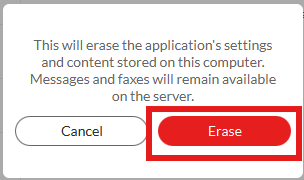
5) When you load the program back up change the sign in option to email and use the email you originally used (i.e loveenergysavings.com) to set up your account as the lovebusiness.co.uk will not affect this sign in (unless your bt account was made with the lovebusiness.co.uk then please proceed to use that)
6) Once Signed back in, it will have a few information pop ups, you can read these if you wish but can close them down. Select area code 1204 and hit apply. 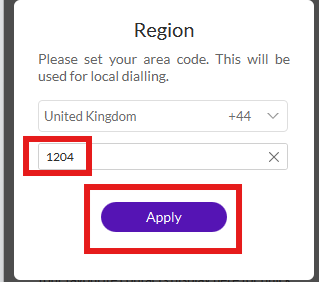
7) To further test headset functionality, please follow the same step to navigate to the settings and click on notifications and sounds. From there you will have the sounds tab, Test the headset and microphone to ensure full functionality
.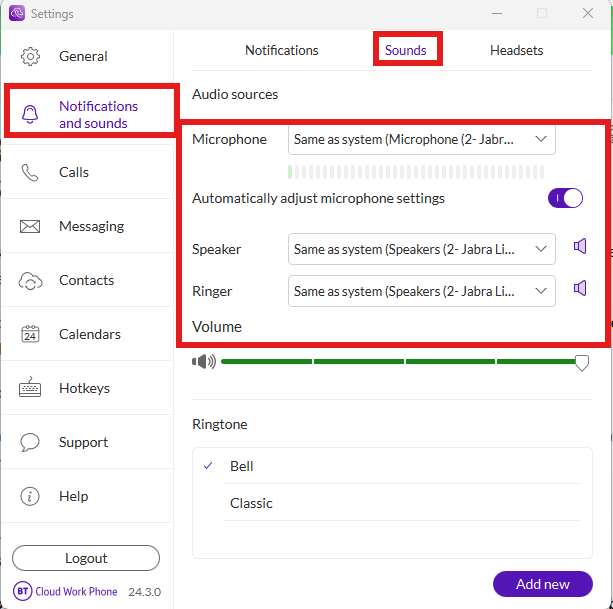
8) If having issues where it drops too loo or too high, set the auto adjust microphone settings to off as this will intervene for you to compensate for too loud or too quiet environments.
Related Articles
How to add a printer
If you are needing to add a printer to your laptop, see the below steps to take for how to do this: 1) Ensure you are connected to either the Love_Internal_Int or Love_Corp WiFi networks. 2) In the search bar next to your start menu, type "printers" ...Installing Applications from the company portal
From the Start Menu, choose the Company Portal application to install work programs. This will be in the "Productivity" section of your pinned apps. 2. Inside the Company Portal app you will see all applications you are approved to install. You might ...